Create a day template (web & desktop version)
Schedule templates are powerful tools that help you quickly set up your ideal day. Learn how to create and use day templates to streamline your daily planning.
Written By Minh Thư
Last updated Over 1 year ago
What are Day Templates?
Day templates are pre-designed daily schedules that you can reuse whenever needed. They help you maintain consistency in your daily routine and save time on repetitive planning.
Limitations
Before creating a template, please note:
Only non-recurring tasks can be included in templates
Tasks synced from other apps (like Google Calendar or Apple Reminders) cannot be part of the templates
Create a day template
Based on the currently-viewing day, you can create a new day template for later effortless planning.
Open the Timeline view of a day
On the left side bar, click on + Add…, and click Day Templates

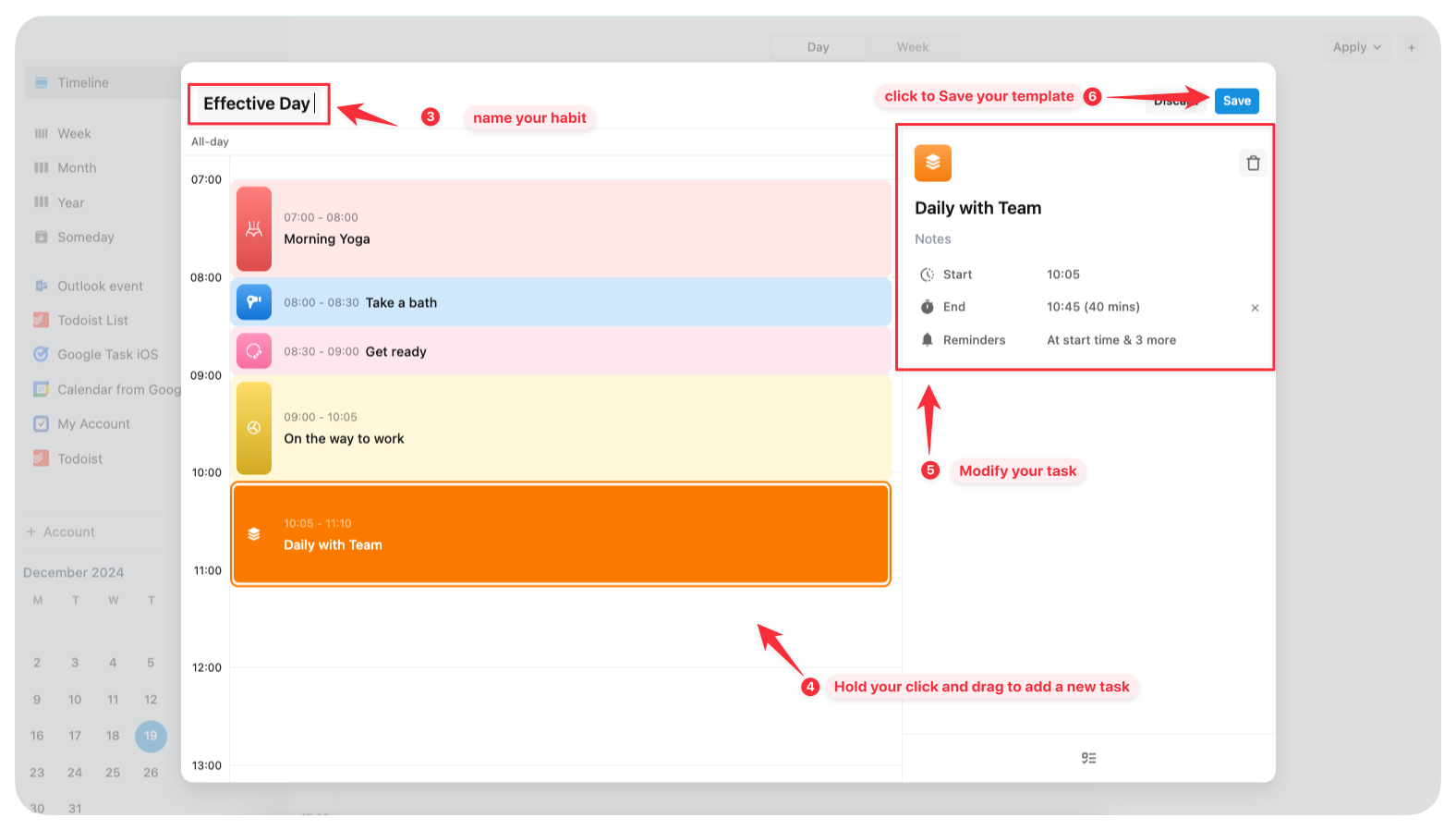
Name your template
On the timeline, you can add more tasks and modify the details
Click Save to save to template
Apply a day template
To apply a day template for a day:
Go to the timeline view of a specific day
On the left sidebar, go to Tools and click Day Templates
Hover on a template in the list and click Apply

You can also apply for several days:
On the date bar, choose a date range
On the left sidebar, go to Tools and click Day Templates
Hover on a template in the list and click Apply
Choose the specific dates from the date range that you want to apply
Then click Apply button above the date bar

Edit a day template
You can add more tasks or remove tasks of a day template by following the steps:
On the left side bar, go to Tools and click Day Templates…
On the right side, you will see the list of your day template, click Manage
Define the template you want to edit and click Edit button
Make changes then click Save
Common Questions
Can I combine multiple templates?
Yes, you can apply several templates for a calendar day.
Can I apply a template to multiple days at once?
In Settings > Automation, you can configure the app to automatically apply a day template to each day in a week for you.
Then every day, by your wake-up time, your day is already prepared with the tasks in the template.
Was this helpful?
Still need help? Share an idea